Tuesday, 8 September 2015

Html And XHtml

Html XHtml:

Xhtml is Html written as XML.

XHTML:

XHtml stands for EXtensible Hyper Text Markup Language.It is almost identical to Html.XHtml is stricter than html.It is Html defined as XML application.XHtml is supported bu all browsers.

Why XHTML Is Used?

On internet many pages contain bad Html.
This html code works fine even if it does not follow html rules in most browsers.

Now a days market consists of many different browser technologies.Some browsers work on mobiles, some works on computers or other devices. Smaller devices like mobiles lack power to interpret bad markup.
XML is markup language where documents must be marked up correctly be well formed.
By combining strengths  of Html and XML,Xhmtl was developed.
XHtml is Html redesigned as XML.

Important Differences From Html:

Document Structure :

1)XHtml doctype is mandatory
2)xmlns attribute in <html> is also mandatory
3)<html> , <head> , <body> and <title>are mandatory

XHtml Elements:

1)Elements of XHtml must be properly nested
2)Elements of Xhtml must be always closed
3)Elements of XHtml must be in lowercase
4)Documents of XHtml must have one root element

XHtml Attributes:

1)Names of attribute must be in lower case
2)Values Of Attribute must be quoted
3)Attribute minimization is foridden

Is Mandatory <Doctype...>:

XHtml document must have XHtml doctype declaration.
<html> , <head> , <title> and <body> elements must be presnt and xmlns attribute in <html> must specify xnl namespace for document.

Example:


Elements Of XHtml Must Be Properly Nested:

Some elements in Html can be improperly nested within each other like this

All elements must be properly nested within each other in XHtml like this

Elements In XHtml Must Be Closed:

It is wrong

It is correct

Empty Elements Also Be Closed:

It is wrong

It is correct

Elements In XHtml Should Be In Lower Case:

It is wrong

It is correct

Attribute Names In Xhtml Must be In Lower Case:

It is wrong

It is correct

Attribute Values Must Be Quoted:

It is wrong

it is correct

Attribute Mininmization Forbidden:

Wrong

Correct

Wrong

Correct

How to Convert From Html to Xhtml:

1)Add XHtml <!Doctype> to first line of every page
2)Add xmlns attribute to html element of every page
3)Change all element names to lowercase
4)Close all empty elements
5)Change all attribute names to lowercase
6)Quote all attribute values

Saturday, 5 September 2015

Html URL Encoding

Html URL:

URL stands for Uniform Resource Locators.
URL is another word for web address.
URL can be composed of words (Learnhtmlwithdanyal.blogspot.com), or an IP(Internet Protocol) address (123.45.30.40).
Commonly people enter name when surfing because names are easier to be remenber instead of numbers.

Uniform Resource Locator - URL:

By using URL web browsers request pages from web servers.
When you click on link In html page an underlying <a> tag pionts to address on web.
Uniform resource locator is used to address a document on web.
Web address like http://www.learnhtmlwithdanyal.blogspot.com follow these syntax rules;

Expalnation:

1)scheme - defines type Internet service ( most common is http)
2)host - defines Domain Host (default host for http is www)
3)domain - defines internet domain name (learnhtmlwithdanyal.blogspot.com)
4)port -defines port number at host (default for http is 80)
5)path -defines path at server (If omitted : the root directory of site)
6)filename -defines name of document or resource

Common Url Schemes:

Table below lists some schemes;

Url Encoding:

By using ASCII character set URLs can only be sent over internet.
As URLs contain character outside ASCII set URL has to converted inoto ASCII.
URL encoding converts character in such format that it can be transmitted over internet.
By hexadecimal digits URL encoding replaces non ASCII character with "%".
URL encoding normally replaces space with +(plus) sign, or %20.

ASCII ENCODING EXAMPLES:

According to character set used in your page,your browser will encode input.
Default char-set in html5 is UTF-8.

Thursday, 3 September 2015

Html Character Set

Html Encoding (Character Sets):

A web browser must know character set, To display Html page correctly.

Character Encoding?

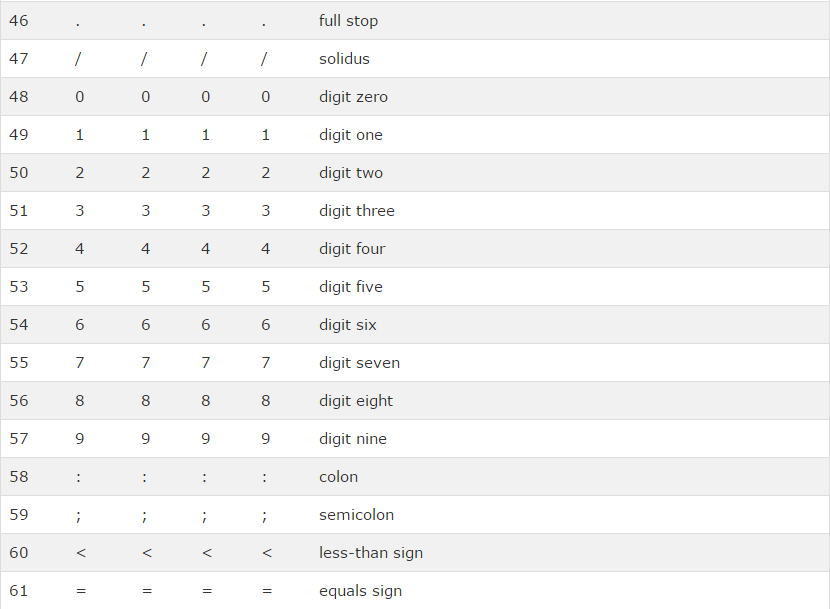
ASCII was first character set also called character encoding standard.It defines 127 different alphanumeric characters that can be used on internet.
ASCII supports numbers (0 to 9),English letters(A to Z) and some special characters like ! $ + -
( ) @ < >.
ANSII (windows-1252) was original windows char-set.It supports 256 Character codes.
ISO-8859-1 was default char-set for html 4.It also supports 256 Char-set codes.
As ANSI and ISO were limited so character encoding was changed to UTF-8 in Html5.
UTF-8 COVERS ALL CHARACTERS AND SYMBOLS IN WORLD.
Html 4 processors are also supports UTF-8.

Html Charset Attribute:

In order to dispaly html page correctly, a web browser must know character set used in page.
This is specified in <meta> tag;

For Html 4:


For Html 5:


Difference b/w Char-sets:

Here is difference b/w character set;


ASCII Character Set:

ASCII uses values from 0 to 31 for control characters.
ASCII uses values from 32 to 126 for letters, digits, and symbols.
ASCII doesnot use values from 128 to 255.

ANSI Character Set (Windows-1252):

ANSI is identical to ASCII for values from 0 to 127.
ANSI has proprietarty set of characters for values from 128 to 159.
ANSI is identical to UTF-8 for values from 160 to 255.

ISO-8859-1 Character Set:

8859-1 is identical to ASCII for values from 0 to 127.
8859-1 does not use values from 128 to 159.
8859-1 is identical to UTF-8 for values from 160 to 255.

UTF-8 Character Set:

UTF-8 is identical to ASCII for values from 0 to 127.
UTF-8 does not use values from 128 to 159.
UTF-8is identical to both 8859-1 and ANSI for values from 160 to 225.
UTF-8 continues from value 256 with more than 10,000 different characters.

Wednesday, 2 September 2015

Html Symbol Entities

Html Symbol Entities:

We have discussed about Html Entities.
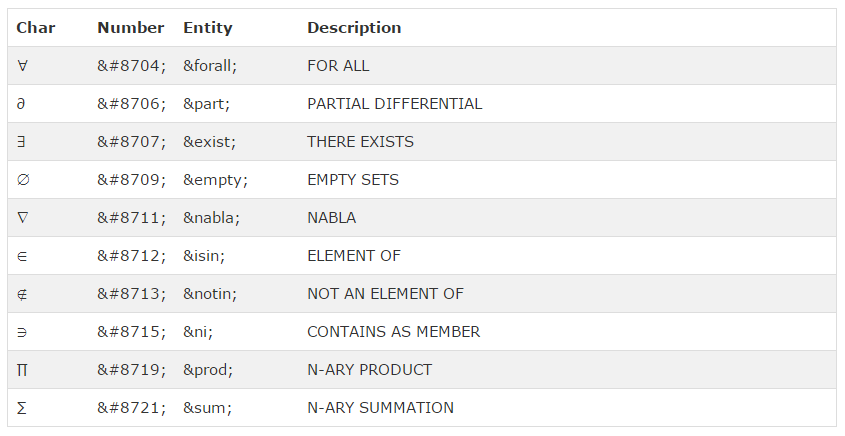
Mathematical, technical, and currency symbols are not present on normal keyboard.
You can add Html entity name,to add these symbols to Html Page.
You can use entity number, decimal reference if no entity name exists.

Example:


Will be dispalyed as:


Mathematical Symbols Supported By Html:


Greek Letters Supported By Html:


Other Entities Supported By Html:


Monday, 31 August 2015

Html Entities

Html Entities:

Some of contents are reserved in Html.
If you use less than (<) or greater than (>) sign ,browser might mix them with tags.
Character entities are used to display reserved characters in Html.
Character entities looks like:

To display less than sign you should use or write &lt; or &#60;
Advantage of using entity name instead of number is that name is easier to remember.

Non-Breaking Space:

Common character entity used is non-breaking space in html .i.e.(&nbsp;).
Remember browser will always remove space in Html pages. If you write 8 spaces in your text it will remove 7 of them.You can use &nbsp; character entity to add real space.

Some More Useful Character Entities:


Entity names are case sensitive.

Combinig Distinguishing Marks:

Distinguishing mark is "glyph" added to letter.
Some marks like grave ( ` ) and acute (  ́ ) are called accents.
Diacritical marks can appear both above and below a letter , inside a letter and between two letters.

Examples:


Sunday, 30 August 2015

Html Head

Html Head:

Html <head> Element:

<head> element is container for metadata means data about data.
Html metadata is about Html document.Metadata is not displayed.
Metadata defines document title,scripts, styles, links, and other meta information.
Following tags describe metadata:
<title>,<style>,<link>,<base> and <script>.

<html> and <body> Omitting?

<html>tag, <body> tag, and <head> tag can be omitted,In Standard Html5.
Following code will validate Html5;

Example:


<html> element is document root.It is recommended place for specifying page language.

Declaring language is important for search engines.
Omitting <html> and <body> can crash badly written XML/DOM software.
Omitting <body> can produce error in older browsers.

Omitting <head>:

In html 5 ,<head> tag can also be omitted.
Browser will add all elements before <body. to default <head> element.
By omitting ,<head> tag you can reduce complexity.

Example:


Html <title> Element:

<title> element defines title of document.
<title> element is required in all Html/Xhtml documents.
The title element:
1)Defines title in browser
2)Provides title for page when it is added to favourites.
3)Displays title for page in search engine results.
Simplified html document;

Example:


Html <style> Element:

<style> element defines style information for Html document.
Inside <style> element you specify hoe Html elements should render in bowser;

Example:


Html <link> Element:

<link> element defines page relationship to an external resource.
<link> element is most often used to link style sheets;

Example:


Html <meta> Element:

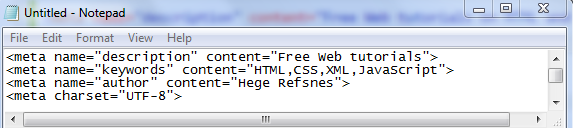
<meta> element is used to specify page discription, author, keywords, search engine, and other services.

Define keywords for search engines:


Define discription of your page:


Define character set used :


Define author:


Refresh document after every 30 seconds:


<meta> tags Example:


Html <script> Element:

<script> element is used to define client side Javascript.

Example:


Html <base> Element:

<base> element specifies base URL.

Example:


Html Head Elements: